Set a new pair up in this order: charge it fully, install the manufacturer app and apply any firmware update, run the ear-tip fit test or try every tip size, choose a codec deliberately (LDAC or aptX for quality, AAC for stability), configure multipoint and wear detection, and reduce the canceling-mode list to the two or three you will actually cycle through with a one-press transparency mode.
The six steps
What to do in the first fifteen minutes
- Charge it fully first. A partial first charge leaves the battery indicator misreporting for several cycles, and most firmware updaters refuse to run on a low cell.
- Install the app and update the firmware. Canceling behaviour, multipoint reliability and codec support all change in firmware. The version in the box is almost never the current one.
- Get the seal right. For earbuds, use the fit test or try every tip. For over-ears, check the pad meets skin all the way round. This is the step that changes canceling most, and how to improve noise canceling covers it in full.
- Choose a codec. Not a default. See the table below.
- Set multipoint and wear detection. Two settings that are genuinely personal and genuinely annoying when wrong.
- Trim the mode list. Most apps ship four or five canceling modes. Keep the two you use and put transparency one press away.
Codecs
Choosing the codec, in one table
| If you want | Select | Why |
|---|---|---|
| Best quality on Android | LDAC or aptX Lossless | Highest bitrate available on these products |
| Best stability in a crowd | AAC or SBC | Lower bitrate survives a congested 2.4 GHz band |
| Lowest latency for video | A low-latency codec, if offered | Keeps audio aligned with the picture |
| Longest battery | AAC or SBC | High-bitrate codecs cost rated hours |
| On iPhone | AAC, usually automatic | LDAC is not supported by iOS |
LDAC versus AAC for travel goes through when the difference is audible at all, and Bluetooth latency on a plane covers the video case.
The default settings were chosen to make the product demonstrate well in a shop. A shop is not a cabin.
Settings
Four app settings that are worth changing
Adaptive canceling: usually off
Adaptive modes change the amount of canceling based on what the microphones hear. On a plane, where the noise is constant, that is motion where you want stillness, and some people hear the adjustments. Set a fixed maximum for a flight and let adaptive handle a street.
Wear detection: decide deliberately
Automatic pause when you lift an earcup is excellent for an office and actively bad in a bunk or a reclined seat, where a shifted pad stops your audio for no reason. There is no right answer, only a decision.
EQ: one change, not five
A small reduction in the bass shelf makes speech and narration clearer, which is most of what people actually want from an EQ. Large curves applied to a canceling headphone usually make it worse.
Multipoint: pair the two you use
Phone and laptop, not phone and tablet-you-charge-twice-a-year. Multipoint costs rated hours and adds a switching delay, so it should buy you something real — the multipoint roundup covers which products do it well.
Before you fly
The five-minute pre-flight check
- Charge, and charge the case. An earbud case is a second battery that is easy to forget.
- Pack the cable. Or confirm the aircraft supports Bluetooth pairing — in-flight entertainment and Bluetooth is the current state of that.
- Download offline media. Setup is wasted if you have nothing to play.
- Pair before boarding. A crowded gate is easier than a dark cabin, and first pairing in flight mode can be awkward.
- Put transparency on the button. You will want it the moment the crew speaks.
Not worth it
Three setup rituals that do nothing
“Burning in” the drivers. There is no published measurement showing a meaningful change in a modern dynamic driver from playing noise at it for 48 hours.
Draining to zero before the first charge. That is advice for a battery chemistry these products do not use. Charge it when it is convenient.
Factory-resetting a working pair. Reset when something is wrong, not as maintenance. It clears your settings and your paired devices for no gain.
In short
Key takeaways
- Charge fully, then update firmware before judging anything about the product.
- The seal does more for canceling than any setting. Run the fit test or try every tip.
- Choose a codec on purpose: LDAC or aptX for quality, AAC for stability and iPhone.
- Set a fixed canceling level for a flight rather than leaving adaptive mode in charge.
- Put transparency one press away. If it takes a menu, you will miss announcements.
- Burn-in, zero-draining and routine factory resets achieve nothing. Skip all three.
At a glance
Quick picks
Scores are our editorial judgment from published specifications and cited third-party measurements, not our own testing. The rubric is published in full. Tap any row for the full write-up.
| # | Product | Best for | Score | Price |
|---|---|---|---|---|
| 1 | 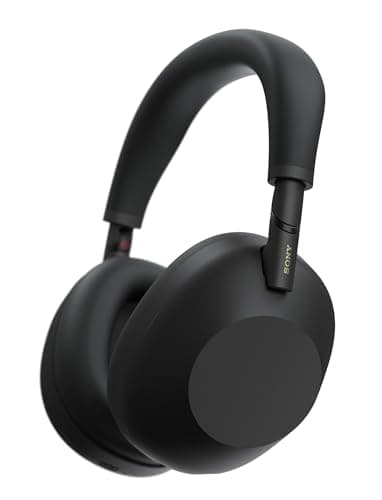 Sony WH-1000XM6The most complete travel headphone on sale: 254 g, 30 rated hours with noise canceling on, and it folds into a case small enough to stop being a decision. | The most settings worth configuring | 9.19.1 out of 10, our editorial score | |
| 2 | 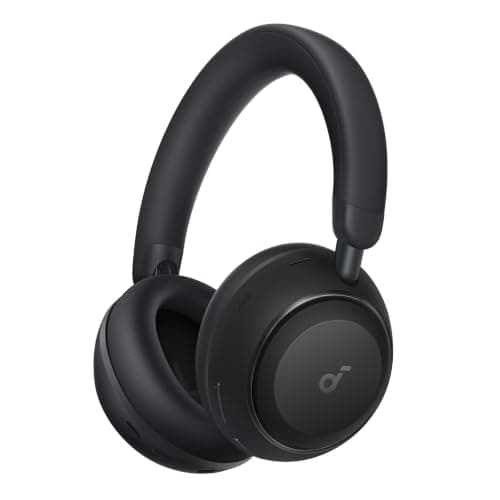 Soundcore Space 2Fifty rated hours with canceling on, a 3.5 mm input and a case in the box, at a fraction of flagship money. The compromise is in the last 10 percent of quiet, not the first 80. | Where the battery setting matters most | 8.28.2 out of 10, our editorial score | |
| 3 | 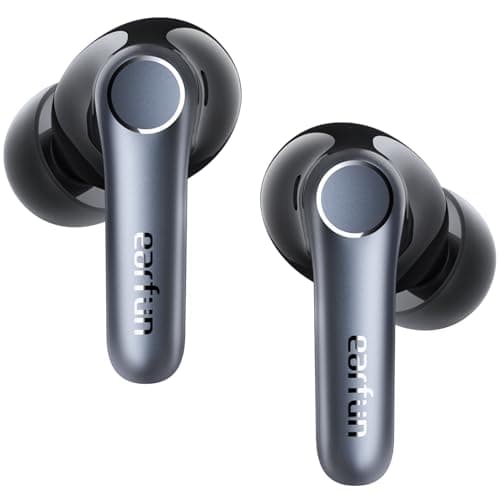 EarFun Air Pro 4Eleven rated hours per bud and 52 with the case, plus LDAC and aptX Lossless, for a small fraction of flagship money. It buys most of the quiet for a little of the price. | Where the fit test matters most | 8.08.0 out of 10, our editorial score |
#ad Amazon links are affiliate links. Prices come from Amazon’s own data on the date stamped under the buttons above; where we have no current figure the button reads “Check price on Amazon” instead of guessing. How this is funded.
The picks in full
Every pick, in detail
1. The most settings worth configuring
Sony WH-1000XM6
The most complete travel headphone on sale: 254 g, 30 rated hours with noise canceling on, and it folds into a case small enough to stop being a decision.
Our editorial score: 9.1 / 10
#ad Price as of November 11, 2026. How this is funded
The product where setup changes the most. It supports SBC, AAC, LDAC and LC3 over Bluetooth 5.3, and which one is active is a decision you make in the app rather than something that happens correctly by default.
Approximately 254 g, up to 30 rated hours with canceling on and 40 with it off, folding into a magnetic-closure case. Set the wired path up too: the 4 Hz to 40,000 Hz wired response works for a seatback screen, but Sony supplies no cable, so buy one before the trip rather than during it.
The single highest-value setting here is a one-press transparency mode. If reaching it takes a menu, you will stop using it, and that is how people end up missing announcements.
What works on a plane
- Folds, which halves the space it takes in a personal item
- 254 g is light for a flagship over-ear, and weight is what you feel at hour four
- LDAC plus LC3 means it is not locked to one phone ecosystem
- 30 rated hours with noise canceling on covers almost any single routing
What does not
- You pay a flagship price for the last increment of noise canceling
- The folding hinge is one more mechanism to eventually wear out
- No airline two-prong adapter in the box
How it scores against the five travel axes
Published specifications
| Spec | Figure | Source |
|---|---|---|
| Weight | Approx. 254 g (9 oz) | Sony Help Guide specifications |
| Battery, NC on | Up to 30 hours | Sony specifications |
| Battery, NC off | Up to 40 hours | Sony specifications |
| Full charge | Approx. 3.5 hours | Sony Help Guide specifications |
| Bluetooth | 5.3 | Sony Help Guide specifications |
| Codecs | SBC, AAC, LDAC, LC3 | Sony Help Guide specifications |
| Wired response | 4 Hz - 40,000 Hz (IEC) | Sony Help Guide specifications |
| Folds | Yes, into a magnetic-closure case | Sony |
| In the box | Headset, headphone cable, USB-C cable, carrying case, documents | Sony Help Guide, Included items |
2. Where the battery setting matters most
Soundcore Space 2
Fifty rated hours with canceling on, a 3.5 mm input and a case in the box, at a fraction of flagship money. The compromise is in the last 10 percent of quiet, not the first 80.
Our editorial score: 8.2 / 10
#ad Price as of November 11, 2026. How this is funded
Up to 50 rated hours with canceling on and up to 70 with it off — a 20-hour difference controlled entirely by one toggle. Setting a sensible default for home listening rather than leaving canceling on permanently is worth more here than on any flagship.
264 g, 40 mm double-layer diaphragm drivers, Bluetooth 6.1, SBC, AAC and LDAC, a 3.5 mm wired input with Hi-Res in wired mode, and five minutes of charge for four hours. Anker’s own laboratory figure for canceling is -37 dB, which is a vendor number.
LDAC is the setting to check after the first firmware update, because enabling it can change which Bluetooth profile the phone negotiates and that is where most pairing oddities on this product come from.
What works on a plane
- Up to 50 rated hours with canceling on, which beats every flagship here
- A 3.5 mm input and a case in the box, so nothing else to buy for a seatback screen
- Five minutes of charge buys four hours, which covers a gate-side mistake
- The cheapest way here to get genuinely useful drone reduction on a plane
What does not
- The -37 dB canceling figure is Anker's own laboratory number, not an independent measurement, and the gap to Bose is audible
- Plainer pad materials than the Sennheiser, so hour four is less comfortable
- Plastic build will not survive being crushed in an overhead bin the way the metal Apple would
How it scores against the five travel axes
Published specifications
| Spec | Figure | Source |
|---|---|---|
| Battery, ANC on | Up to 50 hours | soundcore |
| Battery, ANC off | Up to 70 hours | soundcore |
| Quick charge | 5 minutes gives 4 hours | soundcore |
| Full charge | Approx. 2 hours | soundcore support specifications |
| Weight | 264 g (9.31 oz) | soundcore |
| Bluetooth | 6.1 | soundcore |
| Microphones | 3, with AI enhancement for calls | soundcore |
| Codecs | SBC, AAC, LDAC | soundcore support specifications |
| Drivers | 40 mm double-layer diaphragm | soundcore |
| Canceling depth | -37 dB, measured in Anker's own laboratory | soundcore support specifications |
| In the box | Headphones, charging cable, carrying case | soundcore |
| Wired | 3.5 mm input, Hi-Res in wired mode | soundcore |
3. Where the fit test matters most
EarFun Air Pro 4
Eleven rated hours per bud and 52 with the case, plus LDAC and aptX Lossless, for a small fraction of flagship money. It buys most of the quiet for a little of the price.
Our editorial score: 8.0 / 10
#ad Price as of November 11, 2026. How this is funded
An earbud is the form factor where setup makes the largest difference to canceling, because the tip is doing most of the isolation. Work through every supplied tip size on both ears before you decide the product is disappointing.
11 hours per charge and 52 with the case, Qualcomm QCC3091, Bluetooth 5.4, aptX Lossless, LDAC, AAC and SBC, and 10 mm composite dynamic drivers. EarFun’s own QuietSmart 3.0 claim is up to 50 dB — again a vendor figure.
With four codecs supported, this is also the product where choosing one deliberately matters: aptX Lossless and LDAC for music on Android, AAC for everything Apple, and a low-latency option if you watch films on the move.
What works on a plane
- Eleven rated hours per bud is longer than any premium earbud here
- 52 hours with the case means a two-week trip without a charger thought
- aptX Lossless and LDAC at this price is genuinely unusual
- Losing one on a plane is an annoyance rather than a disaster
What does not
- The 50 dB figure is EarFun's own rating, not an independent measurement, and the gap to Bose is clear
- Adaptive canceling is less steady than the flagships when cabin noise changes
- App polish and firmware support are a step behind the majors
How it scores against the five travel axes
Questions
Common questions
How do I set up new noise cancelling headphones?
Charge them fully, install the manufacturer app and apply any firmware update, get the seal right with a fit test or by trying every tip size, choose a codec deliberately, configure multipoint and wear detection, and map a one-press transparency mode to the physical button.
Do I need the manufacturer's app?
For the first setup, yes. Firmware updates, the ear-tip fit test, codec selection, EQ and multipoint configuration all live in the app, and several of those change how the product performs. You can delete it afterwards if you want to.
Which noise cancelling setting should I use on a plane?
A fixed maximum rather than an adaptive mode. Cabin noise is steady, so there is nothing for an adaptive system to usefully react to, and some people hear it adjusting. Keep transparency one press away for announcements.
Should I turn off noise cancelling to save battery?
At home, often yes. The Soundcore Space 2 is rated up to 50 hours with canceling on and up to 70 with it off, so the toggle is worth 20 hours. On a plane, canceling is the thing you paid for and the battery is already sufficient.
Do headphones need burning in?
No. There is no published measurement demonstrating a meaningful change in a modern dynamic driver after a burn-in period. What does change is your own adjustment to the tuning over the first week.
Sources
Where these figures come from
Read next
Related reading
- How to improve noise canceling
The seal, in detail, and the four things people try that do not work.
- LDAC vs AAC for travel
Which codec to select, and when the difference is audible.
- Best multipoint Bluetooth headphones
If the phone-and-laptop setting is the one you care about.
- How to pack headphones for travel
The step after setup, and the one that keeps them working.